Rayan Farouk
There’s a lot to talk about in the finance tab so we’re writing a whole blog just about it.
Firstly, you probably read it a lot, so you wouldn’t mind reading it one more time. Balsam Medico has a complete accounting system impeded into the system. Includes the invoicing, liabilities, expenses and even financial statement reports.
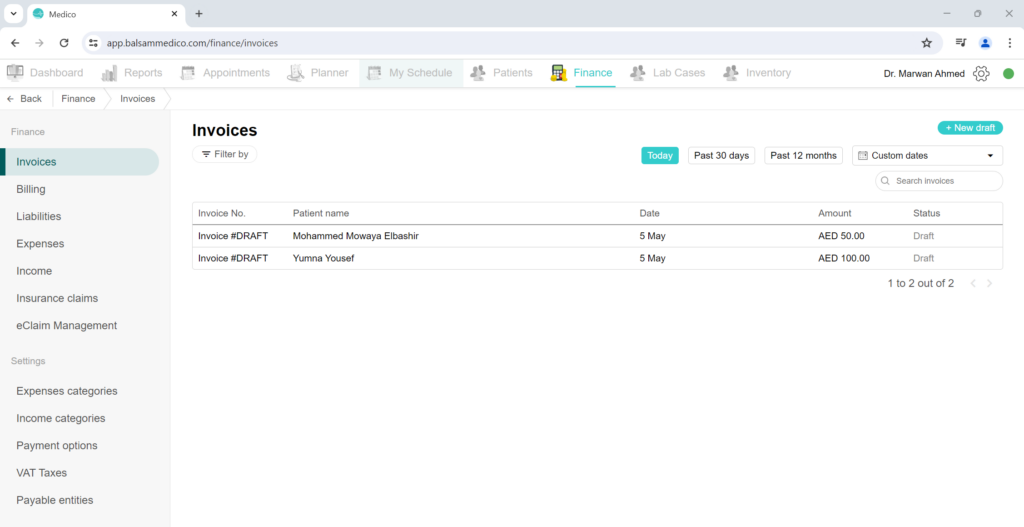
One step at a time, what is included in the Finance page? You can see that it’s separated into Finance and Settings.
In Finance, the available pages are:
- Invoices
- Liabilities
- Expenses
- Income
- Insurance claims
- eClaim Management (if the clinic has an eClaim account)
In Settings, you can find:
- Expenses categories
- Income categories
- Payment options
- VAT Taxes
- Payable entities
It’s best to explain each page on its own. So let’s start with Invoices.
Invoices
To help with the simplification of the workflow, why not add an invoicing system in the same EMR system you’re currently using. Lucky for Medico users, they already have this connection. Keep track of the invoice generation and the payments.
Every treatment that’s added by the doctor gets added automatically into the patient invoice. To access the patient invoice from the appointment page, just click the appointment box to open the details box. At the bottom of the box is the “open invoice” button. This takes you to the patient invoice. This can be done to open a specific patient’s invoice. But to view all the clinics invoice, open the Finance tab and click on invoices.
This will open all the invoices created by the clinic. The list can be filtered by time and invoice status. You can even search by invoice number by adding the hashtag (#), patient name, and phone number.
You can add a new draft to add a new bill item. And for automated invoices, you can select them from the list. Once opened, the treatments added by the doctor are shown in the invoice. You can add a discount to each billable item. To add another bill item such as X-ray services, or products like toothpaste or mouthwash, click on “Add new bill item” and choose the desired item from the list. Once done and through, simply generate your invoice and start adding the payments. In the scenario where the patient only pays a percentage of the full amount, simply add the amount they paid and the system will calculate the remaining amount to be paid. That in turn changes the status of the invoice to “Paid partially”.
Included in the invoice is the VAT taxes. If your clinic is registered in the VAT Taxes, you can add the tax into the system so every invoice created will include the VAT Tax.
VAT TAX
We’ve talked about it in the previous blog. To refresh your memory, VAT Tax is an indirect tax that is applied based on consumption and use of products or services.
In Medico, all you have to do is set up the tax once. In the Finance tab, under the settings section, click on VAT Tax. Add the percentage and the items applicable to the tax and you’re done. Now every invoice that contains those items will have the VAT tax auto-calculated.
To know more on the VAT Tax, check the previous blog titled “Balsam Medico Features: VAT Tax”
Liabilities and Payable entities
Let’s start with the “Payable entities”. Payable entities are, in simple dental clinic relating terms, are accounts within the clinic that the clinic has to pay for their services or products. As an example, doctors working in the clinic by percentage based salary are what we call a payable entity.
Simply click “Payable entities” under the settings section and add a custom payable entity. You can customize the percentages of each entry. Once it is done, the system over time calculates the amount to be paid to these entities.
In Liabilities, you can view the amount the clinic owes each entity. And click to pay.
Expenses and Expenses categories
Clinic expenses are a crucial part to document to make sure the cash inflows and outflows is considerable and the clinic is not spending more than receiving. To start documenting the expenses, let’s start with the expenses categories. Under settings sections, in the Expenses categories, you can add the categories to separate the different expenses types. After adding the categories, you can move to Expenses in the Finance section. Add an expense with the cost and date. Now the expenses can be viewed as well in the reports.
Payment options
Many clinics use different payment methods. Some examples are:
- Bank Transfer
- Cash
- Credit / Debit Card
- Tabby (a third party service in UAE)
To add more payment methods, just open the payment options page in the settings section and add it. Now it’s included in the payment method of the invoice.
Insurance claims
Insurance claims are documents that formally request a payment submitted by the dental provider or clinic on behalf of the patient to the insurance provider. During the patient visit, the doctor selects the treatment to be performed on the patient. If the patient has insurance and the treatment performed on them is covered by their insurance plan, a claim is automatically drafted. The insurance claim page is suited to manage all the clinic’s claims. Through each claim, you can pop to the eClaimLink Integration and start submitting claims and requesting authorizations.
eClaim Management
The eClaim Management page on the left side of the Finance tab is a central hub for controlling all claims in one view. From this page, you can view your submissions and prior authorizations. And if a couple of claims are ready to be sent and submitted to eClaimLink, why not select them all and send them simultaneously with one click.
You can check our blog titled “Balsam Medico Features: Claim Forms and Management” to learn more on the Insurance claims and eClaim Management pages and features.
In future blogs, we will touch on the invoicing settings and more complex features in the Finance tab.
Connect with Us
Ready to embark on this exciting journey? Contact us today: 📍 Dubai, United Arab Emirates – Tel: +971 56 123 6043 📍 Khartoum, Sudan – Tel: +249 91 273 1048
Explore Balsam Medico and discover a world of efficient clinic management at www.balsammedico.com. Together, let’s reduce fines, elevate efficiency, and embrace a new era of dental healthcare.
Join the Balsam Medico newsletter for exclusive content and the latest news. Be the first to view valuable information and updates!
One last thing..
PS: We built Balsam Medico to be the best software for clinics in UAE and the middle east. It is powerful, flexible, and most importantly, very easy to use.
If you have two minutes, see how it works.
This is the main landing page to learn more.