Rayan Farouk
A patient leaves the consultation room nodding. The doctor explained the diagnosis, the medication schedule, the foods to avoid and the warning signs to watch for. It all made sense at the time. By the time that patient reaches the pharmacy counter, half of it has already faded.
This is not a failure of the patient or the doctor. It is a predictable feature of how people absorb information under stress, in an unfamiliar setting, in a second or third language. Research on health communication has repeatedly shown that patients forget a large share of what they are told during a visit, and that written reinforcement makes a measurable difference to understanding and follow-through.
Most UAE clinics already know this. Many keep a folder of photocopied handouts, a shelf of brochures from suppliers, or a set of PDFs on a shared drive that only one person knows how to find. The intention is right. The execution rarely scales.
This article looks at a more durable approach: building a patient education library inside the clinic management system itself, so that the right take-home material is attached to the right patient, based on the diagnosis already recorded in the chart.
Why Patient Education Belongs Inside the EMR
Handouts kept outside the clinical system depend on memory and goodwill. The doctor has to remember that a handout exists, the receptionist has to remember where it is, and someone has to remember to restock the printer tray. When the clinic is busy, the handout is the first thing to be skipped.
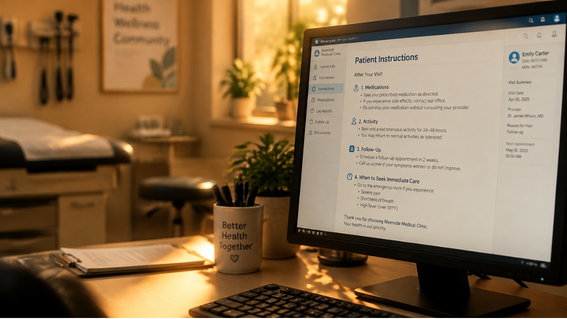
When education material lives inside the EMR, three things change.
- It becomes part of the workflow. The diagnosis is recorded because it has to be, for the chart and for the claim. If the library is tied to that diagnosis, the education step costs the doctor a click rather than a search.
- It becomes consistent. Every patient with the same diagnosis receives the same reviewed, approved wording, regardless of which doctor they saw or which branch they visited.
- It becomes traceable. The chart can show what was given, when, and in which language. That matters for continuity of care and for the clinic’s own quality records.
For clinic owners and administrators, this also turns patient education from an informal courtesy into a managed operational asset, one that can be reviewed, improved and measured like any other process.
What a Diagnosis-Linked Library Actually Is
The idea is simple. Each piece of education material is stored once, in a central library. Each piece is tagged to one or more diagnosis codes, typically ICD-10, which most UAE clinics already use for charting and for insurance claims. When a doctor records a diagnosis during a consultation, the system can surface the matching material and make it available to hand over in the format the patient prefers.
A well-built library has four layers.
- The content. Plain-language explanations, instructions and warning signs, written for patients rather than clinicians.
- The mapping. The link between each document and the diagnosis codes it applies to.
- The delivery. Printing at the front desk or in the consultation room, plus digital routes such as the patient portal, email or a secure message.
- The governance. Clear ownership, review dates and version control so that outdated advice does not sit in the system for years.
Key idea: The diagnosis code is already captured for clinical and billing reasons. A patient education library simply gives that same piece of data a second job: telling the system what the patient needs to read next.
Step 1: Decide the Scope Before Writing Anything
The most common reason these projects stall is ambition. A clinic decides it needs education material for every condition, produces forty documents in a burst of enthusiasm, and then cannot maintain any of them.
A better starting point is data. Pull a report of the most frequent diagnoses recorded in the last six to twelve months. In most general and family practices, a surprisingly short list accounts for the majority of visits. In a dental clinic, the pattern is even tighter: caries, periodontal conditions, post-extraction care, post-root canal care, orthodontic aftercare and whitening or hygiene advice will cover most of the daily volume.
Start with the top fifteen to twenty diagnoses. For each one, ask two questions:
- What is the single most useful thing the patient needs to remember after leaving?
- What is the single most important warning sign that should make them call the clinic or seek urgent care?
If a handout cannot answer those two questions clearly, it is not ready. Everything else is supporting detail.
Step 2: Map Content to Diagnosis Codes Carefully
Mapping is where the library earns its value, and where most of the design thinking is needed. ICD-10 codes are granular. A single clinical condition may have many codes depending on site, severity, laterality or episode of care. If every code needs its own handout, the library becomes unmanageable.
The practical solution is to map at the right level. Some documents attach to a single code. Others attach to a whole category or range of codes.
| Mapping approach | Best used for | Example |
|---|---|---|
| Single code | Highly specific conditions with unique instructions | A particular procedure aftercare sheet |
| Code range or category | Related conditions with similar advice | One handout covering a family of related respiratory diagnoses |
| Multiple documents per code | Conditions needing both general and medication-specific advice | A diabetes overview plus a separate foot-care sheet |
| General fallback | Diagnoses without a dedicated document | A “what to do after your visit” sheet with clinic contact details |
The fallback document deserves more attention than it usually gets. Not every diagnosis will have a dedicated handout, and a patient who receives nothing is worse off than one who receives a short, general sheet explaining how to reach the clinic, when to return, and when to seek emergency care.
Handle multiple diagnoses gracefully
Patients rarely present with just one problem. A patient with hypertension, type 2 diabetes and a respiratory infection could trigger three separate documents. The system should let the doctor select which to give rather than printing everything automatically. Handing a patient a stack of eight pages defeats the purpose. Two or three focused pages are far more likely to be read.
Step 3: Write for the Patient, Not for the Textbook
Content quality determines whether the library is used. A technically accurate document written in clinical language will be filed in a bag and forgotten.
Use plain language and short structure
Aim for a reading level that a general adult audience can follow without effort. Short sentences, common words, and one idea per paragraph. Where a medical term is unavoidable, explain it the first time it appears.
A useful structure for most documents:
- What this condition is in two or three sentences.
- What to do at home as a short, ordered list.
- What to avoid, kept brief.
- Warning signs, clearly separated and easy to spot.
- When your next visit is and how to contact the clinic.
Plan for language from the start
The UAE patient population is one of the most linguistically diverse in the world. Arabic and English cover a large part of it, but many clinics also serve patients who read Urdu, Hindi, Malayalam, Tagalog, Russian or other languages more comfortably.

Build the library so that each document can exist in multiple language versions linked to the same diagnosis mapping. Do not translate by machine and publish without review. Medical instructions are exactly the type of text where a small translation error can change the meaning of a dosage, a timing or a warning sign. Have a qualified bilingual team member review each version, and record the review date.
For Arabic documents, check the layout as well as the words. Right-to-left text, mixed Arabic and English drug names, and numerals all need to display correctly in both the screen view and the printed version.
Step 4: Choose Your Delivery Routes
A library is only as useful as the routes that carry its content to the patient. Most clinics benefit from offering more than one.
Printed take-home sheets
Print remains the most reliable route for many patients, including older patients, patients without a smartphone and patients who simply prefer paper. Printing from inside the EMR also allows the clinic to add the patient’s name, the visit date and the doctor’s name automatically, which makes the sheet feel personal rather than generic.
Set a consistent print format: clinic branding, clinic contact number, and a short footer reminding the patient to contact the clinic if anything is unclear. Keep documents to one page where possible, and two at most.
Patient portal access
Where the clinic offers a patient portal, education material attached to a visit can sit alongside appointment history and other records. The advantage is permanence. The patient can return to the instructions three days later, when the anaesthetic has worn off and the questions begin.
Secure digital sharing
Email and messaging apps are convenient, but they raise privacy questions that clinics need to think through. Education material that names the patient and the diagnosis is personal health information. Before sending anything through a messaging channel, confirm that the route aligns with the clinic’s data protection obligations and internal policy. This is covered in more detail below.
Step 5: Build the Handover Into the Consultation Flow
A library that requires extra steps will not be used consistently. The goal is to make the handover a natural part of closing the consultation.
A workable flow looks like this:
- The doctor records the diagnosis during the consultation.
- The system suggests the matching education material based on the diagnosis code.
- The doctor confirms or adjusts the selection and chooses the language.
- The material is printed at reception or released to the patient’s portal or contact.
- The chart records that education material was provided.
Reception staff play an important supporting role. If the doctor selects the material, the front desk can print and hand it over while completing the payment and next-appointment steps. This keeps the doctor’s time focused on care and ensures the patient does not leave without the sheet.

Practical tip: Agree one sentence that every team member uses when handing over a sheet, such as: “This explains what the doctor discussed and who to call if you have questions.” A consistent phrase makes patients more likely to keep and read the document.
Privacy and Compliance Considerations in the UAE
Patient education material is rarely sensitive in itself, but the moment it is linked to a named patient and a diagnosis, it becomes part of that patient’s health information. That brings the usual obligations into play.
UAE clinics operate within a layered framework that includes federal data protection law, the federal law on the use of information and communication technology in health fields, and emirate-level requirements from health authorities such as the Dubai Health Authority, the Department of Health in Abu Dhabi and the Sharjah Health Authority. Requirements differ by emirate and can change, so clinics should confirm their obligations with their own regulator and legal advisers rather than relying on a general summary.
A few practical principles apply regardless of the specific rules:
- Limit what is shared digitally. If a handout does not need the patient’s name or diagnosis printed on it, consider whether a generic version is appropriate for digital sharing.
- Use approved channels. Prefer the portal or other channels the clinic has assessed for security and consent, rather than personal phones or unmanaged apps.
- Record consent and preferences. Note how the patient agreed to receive material and in which language.
- Control who can edit the library. Only authorised staff should be able to change clinical content, and every change should be logged.
Clinic owners should also keep in mind that medical advice in a handout carries the clinic’s name. Content should be reviewed by a qualified clinician before publication, and clinics should avoid copying material from other organisations without checking the rights to reuse it.
Governance: Keeping the Library Accurate
The greatest long-term risk to a patient education library is not that it is never built. It is that it is built once and never touched again. Clinical guidance evolves, medication names change, and clinic details move. A handout with an old phone number or outdated advice quietly undermines trust.
Put simple governance in place from the first day:
- Assign an owner. One named person, usually a senior clinician or clinical lead, is accountable for the library.
- Set review dates. Each document carries a review date, commonly every twelve months, with an earlier review whenever guidance changes.
- Version everything. Keep a record of previous versions so the clinic can show what a patient received on a given date.
- Retire gracefully. When a document is replaced, remove the old version from active use but keep it in the archive.
- Collect staff feedback. Doctors and nurses know quickly when a handout confuses patients. Create an easy route for them to flag it.
Measuring Whether It Is Working
- Coverage rate. What percentage of eligible consultations ended with education material provided? Low coverage usually points to a workflow problem rather than a content problem.
- Library usage. Which documents are used most, and which are never opened? Unused documents may be poorly mapped or poorly titled.
- Language mix. Are patients receiving material in the language they actually read? Gaps here suggest where to invest in translation.
- Follow-up calls. Are routine “what do I do now?” calls decreasing for the conditions covered? Reception teams often notice this first.
How to Put This Into Practice With Balsam Medico
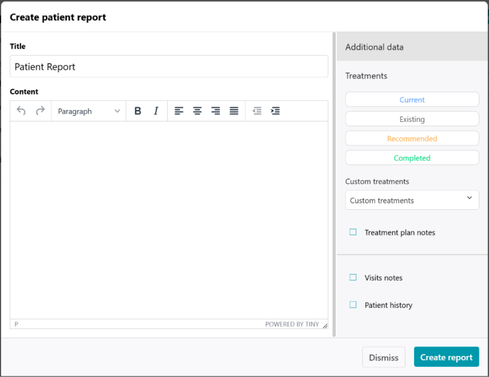
In Balsam Medico, patient education is doctor-led and sits inside the patient’s own record. During the consultation, the doctor adds the diagnosis and treatment to the patient’s current visit, exactly as they would for any other appointment. Once that is done, the doctor opens the patient report page from the patient profile and creates a template report that contains the education material for that condition. The report uses the same Balsam Medico layout as the clinic’s other documents, so the patient receives something that looks consistent and professional. Because the material is built as a template, the clinic can prepare reports for its most common conditions once and reuse them, rather than rewriting instructions for every patient. The doctor stays in control of what each patient receives, and the clinic does not need a separate folder of handouts to maintain.
Bringing It Together
A patient education library is not a technology project. It is a communication project that technology makes consistent and scalable. The clinical system already knows the diagnosis. Connecting that information to clear, reviewed, patient-friendly material means every visit ends with something the patient can read, share with family and return to when questions arise.
For clinic administrators, the benefits extend beyond patient care. Consistent education supports clearer expectations, fewer avoidable calls to reception, and a more professional impression of the practice. For doctors, it removes the burden of repeating the same explanations dozens of times a week while still giving each patient the attention they deserve in the room.
Start small, write plainly, map carefully, review regularly. A library of twenty good documents, used on every eligible visit, will do more for your patients than a shelf of hundreds that nobody opens.
Connect with Us
Ready to embark on this exciting journey? Contact us today:
📍 Dubai, United Arab Emirates – Tel: +971 56 640 9602
📍 Khartoum, Sudan – Tel: +249 91 273 1048
Explore Balsam Medico and discover a world of efficient clinic management at www.balsammedico.com. Together, let’s reduce fines, elevate efficiency, and embrace a new era of dental healthcare.
One last thing..
PS: We built Balsam Medico to be the best software for clinics in UAE and the middle east. It is powerful, flexible, and most importantly, very easy to use.
If you have two minutes, see how it works.
This is the main landing page to learn more.